AI Exterior Designer: Reimagine Your Home's Facade in Seconds for free

Upload a photo of your house and watch AI redesign the exterior instantly — new siding, paint, roof, windows, and landscaping. Perfect for homeowners planning a remodel, agents staging curb appeal, and anyone who wants to see the finished look before hiring a contractor.

Try Free Exterior Designer →

No credit card required • Get 2 free designs

Real Exterior Transformations: Before & After

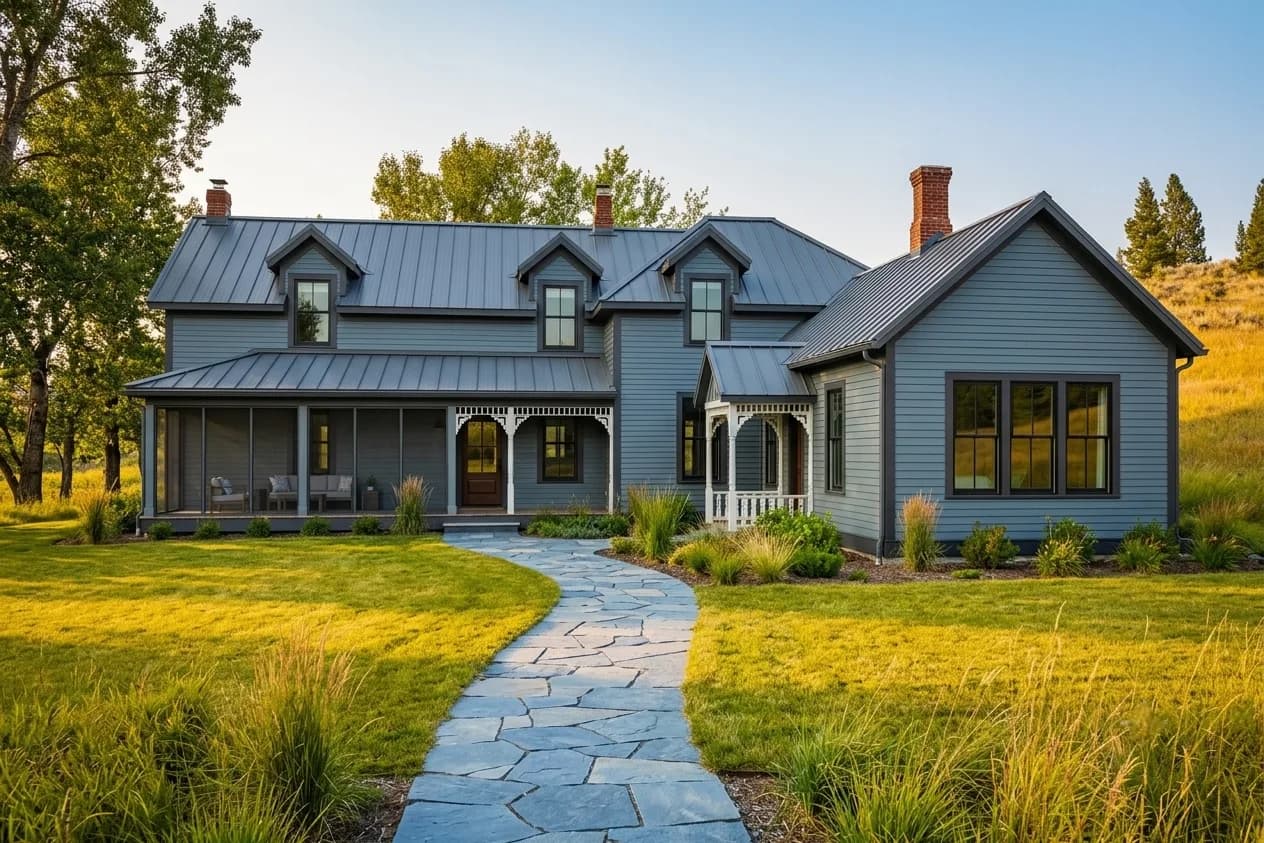
See how our AI exterior designer turned a tired, dated facade into a clean, modern home — without touching the roofline or the home's footprint. The structure stays the same; the cladding, colour, and landscaping do the work.
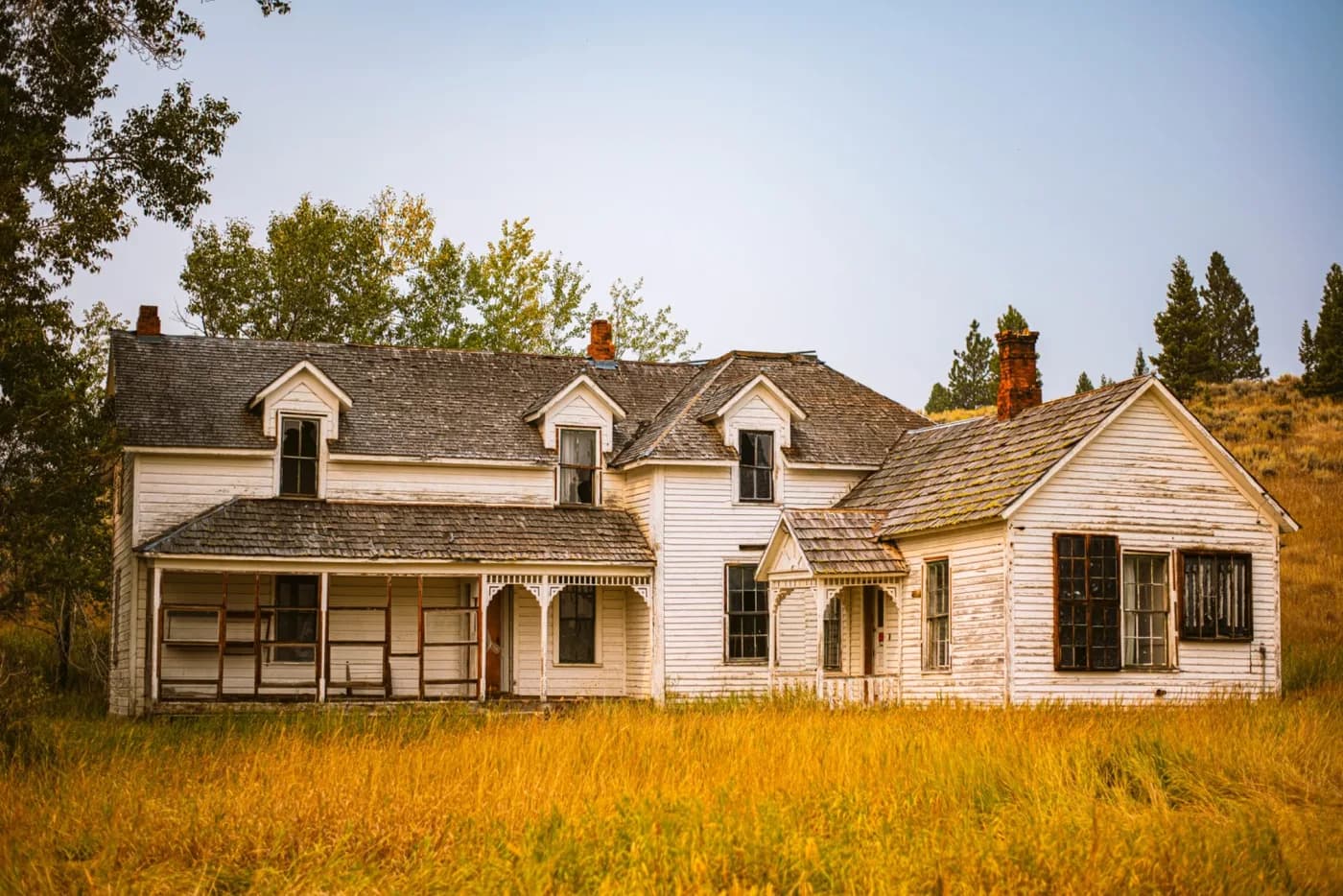
Dated single-story home with faded beige siding, an old roof, and overgrown front yard before AI exterior redesign
Before: Faded beige siding, aging roof, dated trim, overgrown and patchy front yard
Modern home exterior with dark vertical siding, white trim, a new front door, and clean landscaping after AI design
After: Dark vertical siding, crisp white trim, bold front door, tidy modern landscaping

What Changed in This Exterior Redesign:

  • Faded beige siding replaced with dark, modern vertical board-and-batten
  • Dated trim refreshed to crisp white for high contrast and a clean edge
  • Old front door swapped for a bold statement door that anchors the entry
  • Aging roof colour updated to a charcoal tone that grounds the palette
  • Overgrown yard replaced with structured planting, a clean path, and lawn
  • Exterior lighting added to highlight the architecture after dark

What Is an AI Exterior Designer?

An AI exterior designer is a tool that takes a single photo of your home's facade and re-renders it in a new style — modern farmhouse, contemporary, craftsman, Mediterranean and more — while preserving the home's actual shape, rooflines, and windows. It lets you test siding, paint colours, roofing, doors, and landscaping on your real house before committing to expensive materials.

Choosing exterior finishes is one of the highest-stakes decisions in any remodel: siding and paint are costly, permanent, and impossible to judge from a small sample. AI exterior design removes the guesswork by showing the whole house in the new finish, in context, with its real surroundings and light.

It's used by homeowners planning a facade remodel, real estate agents boosting curb appeal before a listing, contractors and designers presenting options to clients, and buyers who want to see a property's potential before they make an offer.

How to Use the AI Exterior Designer (Step-by-Step)

Step 1: Upload a Photo of Your Home

Take a straight-on or slight-angle photo of the front of the house in daylight, capturing the full facade. Clear, well-lit shots give the AI the most accurate read of the structure.

Step 2: Choose an Architectural Style

Select from styles like Modern, Modern Farmhouse, Craftsman, Mediterranean, Contemporary, or Colonial. Each applies a coherent palette of siding, trim, roofing, and detailing.

Step 3: Add Specific Requirements (Optional)

Add notes like 'dark siding with white trim', 'add stone accents to the base', 'black-framed windows', or 'modern landscaping' to fine-tune the materials and colours.

Step 4: Generate & Download

Generate in about 30 seconds and download photorealistic results to share with a contractor for quotes, with your HOA for approval, or to compare colour directions side by side.

Ready to Boost Your Curb Appeal?

Start Free Exterior Design →

Popular Exterior Design Styles for 2026

Our AI exterior designer supports every major architectural look. Here are the most requested styles:

Modern Exterior

Flat or low-slope rooflines, dark monochrome siding, large windows, and minimal ornamentation. Clean geometry and bold contrast define the look.

Modern Farmhouse

Crisp white or dark board-and-batten siding, black-framed windows, a metal roof accent, and a welcoming covered porch. Currently the most-requested style.

Craftsman

Tapered columns, exposed rafter tails, mixed siding and stone, earthy tones, and rich detailing around the porch and entry.

Mediterranean

Stucco walls, a terracotta tile roof, arched openings, and warm sandy tones for a sun-washed, resort-like feel.

Contemporary

A mix of materials — wood, metal, stone, and render — with asymmetric massing, flat planes, and a refined neutral palette.

Colonial & Traditional

Symmetrical facades, shutters, a centred front door, and classic siding in timeless colours for a refined, established look.

💡 Trying to pick a siding colour? Render two or three on your actual house — colours read completely differently at full scale and in real daylight.

AI Exterior Designer vs Hiring an Architect or Designer

FactorAI Exterior DesignerTraditional Designer
CostFree – $39/month$2,000 – $10,000+ for facade design
Speed~30 seconds3 – 6 weeks for first renderings
RevisionsUnlimited & instantLimited, billed per revision
Best ForTesting colours & materials, curb appeal, quick comparisonsStructural changes, additions, permit drawings
FlexibilityTry many styles on your real homeConstrained by scope and budget

When to use AI: Use AI to settle the look — siding, colour, roof, door, and landscaping — and to get everyone aligned before you request contractor quotes.

When to hire a pro: Hire a professional when you're changing the structure, adding square footage, or need stamped construction drawings and permits.

Who Should Use an AI Exterior Designer?

🏠 Homeowners Planning a Remodel

See new siding, paint, and roofing on your actual house before committing to materials that are expensive and permanent. Avoid a costly colour mistake.

🏢 Real Estate Agents

Show buyers a property's curb-appeal potential, or stage a tired facade in a listing. Strong curb appeal measurably lifts perceived value and first impressions.

🌿 Landscapers & Designers

Present clients with a clear before-and-after of facade and landscaping changes together, so the whole exterior reads as one cohesive plan.

🔨 Contractors & Remodelers

Help clients decide quickly by showing options photorealistically, reducing back-and-forth and change orders later in the project.

🔑 Home Buyers

Look past a dated facade and visualise a property's true potential before you make an offer or plan a renovation budget.

AI Exterior Design by Element

A facade redesign is the sum of a few big decisions. Here's how to approach each with AI:

Siding & Cladding

Test board-and-batten, lap siding, stucco, brick, or mixed materials on your real walls. Material has as much impact as colour — compare a few before you price anything.

Exterior Paint & Colour

See whole-house colour combinations — body, trim, and accent — in real daylight. A colour that looks safe on a chip can read very differently across an entire facade.

Roof, Doors & Windows

Swap roof colour, add black-framed windows, or test a bold front door. These smaller moves often deliver the biggest jump in curb appeal for the budget.

Landscaping & Entry

Visualise structured planting, a clean walkway, and exterior lighting. Tidy, intentional landscaping frames the home and makes every other change look more finished.

Transform Your Home's Exterior Today with AI

Join thousands of homeowners using HouseGPTs to redesign their facade and boost curb appeal before they hire anyone. Get started free — no credit card required.

Start Designing Your Exterior Free →

✓ 2 free designs • ✓ No credit card • ✓ Results in 30 seconds

Frequently Asked Questions About AI Exterior Design

The practical questions people ask before changing a facade.

Will the AI keep my roofline, windows, and extension as they are?

Yes. The AI reads your home's existing massing — roof pitch, chimney positions, window and door openings, porches, and extensions — and keeps that geometry while changing the finishes on top of it. That is what makes the render useful: you are seeing your actual house in a new material and colour, not a generic house in your style. If you want a structural change visualised, such as a new porch or a rendered extension, ask for it explicitly and treat the output as a concept to take to an architect.

Can I test render and cladding colours before committing to a quote?

That is the most common use of the tool. Exterior colour is the single hardest decision to make from a sample board, because a shade that looks soft on a 100mm card can read very differently across an entire two-storey elevation in daylight. Generate the same house in four or five candidate colours, view them full-screen rather than as thumbnails, and the wrong ones usually eliminate themselves immediately. Do this before the scaffolding goes up, not after.

Does it work on terraced or semi-detached homes where only the front is visible?

Yes. Photograph the elevation you can actually see — for most terraced and semi-detached homes that is the front, straight on from the pavement. The AI will restyle that facade while leaving the neighbouring properties in the frame recognisable. For semi-detached homes it is worth adding 'only change my half' to the requirements so the render stays realistic about what you can actually alter without your neighbour's agreement.

Can it show landscaping, driveway, and boundary changes too?

Yes, and the front garden usually does more visual work than people expect. Ask for specific changes — 'replace the concrete drive with permeable block paving', 'add low hedging and a path to the front door', 'remove the wall and plant a border' — rather than a vague 'improve the garden'. Kerb appeal is a combination of the facade and everything in front of it, so it is worth generating one version that changes only the landscaping to see how much of the improvement comes from that alone.

How realistic are the material renders — brick, render, stone, timber?

Material rendering is a genuine strength: the AI reproduces the texture, joint pattern, and light behaviour of common cladding materials convincingly, which is what tells you whether a material suits your home's scale and period. What it does not know is your local supply — a brick blend that looks right in the render may not be available in your region, and mortar colour alone can shift the finished look substantially. Use the render to choose the material and tone, then match it against real samples viewed outdoors.

Can I use an AI render in a planning application?

Not as a substitute for the drawings a planning application requires. Councils expect scaled elevations, site plans, and technical drawings prepared by an architect or architectural technologist, and an AI visualisation is none of those. Where it does help is earlier: agreeing a direction with your household, sounding out a pre-application conversation, or showing neighbours what you are proposing. Some applicants include a visualisation alongside the formal drawings as supporting context — check what your local authority accepts.

Will the AI account for my climate when suggesting materials?

Only if you tell it. The model is a visual tool, not a building-performance one, so it will happily render a material that would weather badly where you live. Add the context — 'coastal, high salt exposure', 'wet northern climate', 'hot and dry with strong UV' — and the suggestions become far more sensible. Whatever it produces, confirm durability, maintenance interval, and fire performance with a supplier or builder before specifying anything.

Can I see my house at different times of day or in different seasons?

Yes, and for exteriors it is worth doing. Ask for 'overcast winter daylight' as well as 'bright summer sun' — a facade colour chosen on a sunny render can look considerably heavier under grey skies, which is the condition many homes sit in for much of the year. Evening renders with exterior lighting on are useful separately, as they show whether the entrance and drive are actually legible after dark.

How should I photograph a house that's set back or hidden behind trees?

Get as much of the facade in the frame as you can, even if it means standing across the road and shooting slightly wider. Straight-on beats an angled shot for exterior work, because the AI can read the elevation cleanly. Overcast daylight is more forgiving than harsh direct sun, which throws deep shadows the model has to guess behind. If foliage covers a large part of the facade, a winter photograph will give you a noticeably better result than a summer one.

Can I modernise the house while keeping its original features?

Yes, and it is usually the better-looking outcome. Name the features you want retained — 'keep the bay windows', 'keep the stone lintels and cills', 'retain the original front door and fanlight' — and ask for the modernisation around them. Period features are what give an older home its character and its value; stripping them out in favour of a flat contemporary facade often makes a house look newer and worth less. Generating both versions makes that trade-off obvious.

Does an exterior refresh actually affect resale value?

Kerb appeal disproportionately affects how a property is perceived, because the facade is the first thing a buyer sees and it sets their expectation of everything inside. Cosmetic exterior work — cladding or render, windows, door, driveway, landscaping — is generally among the better-returning improvements, though the actual figure depends heavily on your local market and the condition of comparable homes nearby. The tool shows you what the change looks like; ask a local agent what it is worth.

Can I use the render to get quotes from builders?

Yes, and it tends to make quotes more accurate. Most exterior quoting variance comes from the builder and the homeowner picturing different things — a render of your own house removes that ambiguity in one image. Bring it to the first site visit along with the measurements and any material preferences. Expect the builder to push back on parts of it: what a render shows and what is buildable on a specific wall build-up are not always the same, and that conversation is worth having early.

What if my home is listed or in a conservation area?

Use the tool for exploration, but be aware that the constraint is legal rather than aesthetic. Listed buildings and conservation areas restrict what you can change to the external appearance, sometimes down to window materials, mortar mix, and paint colour, and unauthorised work can be enforced against. Generate the options, then take them to your local conservation officer before committing to anything. A visualisation is a useful thing to bring to that conversation — it just is not permission.

AI Exterior Design — Redesign Your Home's Facade in Seconds

HouseGPTs AI Exterior Designer lets you upload a photo of any house and see it transformed into any architectural style — Modern, Victorian, Mediterranean, Farmhouse, and 30+ more — in under 30 seconds. No design software. No architect needed for the exploration phase.

  • Upload any exterior photo and see a photorealistic redesign in 30 seconds
  • 30+ architectural styles — Modern, Traditional, Mediterranean, Farmhouse, and more
  • Choose from 30+ cladding materials — brick, stone, render, timber, metal panels
  • AI preserves your home's structure — windows, doors, and rooflines stay accurate
  • Download full-resolution results to share with architects, builders, or agents
  • Free to try — 2 designs free, no credit card required

Why Homeowners Use AI Before Hiring a Designer

Traditional exterior design consultations cost $2,000–$5,000 and take 2–4 weeks just to produce initial concept renders. AI exterior design tools generate the same quality of visual output in 30 seconds — letting you explore far more options before deciding which direction to pursue.

Whether you're planning a full renovation, prepping a property for sale, or just curious what your home could look like in a different style, AI exterior design gives you the visual confidence to make informed decisions and brief contractors more effectively.

Who Uses This Tool

🏠

Home renovation planning

See exactly what your renovation will look like before breaking ground — and avoid expensive change-of-mind costs.

🏡

Real estate & staging

Generate virtual renovations to help buyers see the property's potential and achieve higher sale prices.

🏗️

Architect & builder briefs

Share AI renders with your design team to get aligned on the visual direction from day one.

💡 Pro Tips for Better Results

1

Photograph your home on an overcast day — flat, even light produces the best AI results.

2

Include as much of the facade as possible; a corner shot showing two elevations works best.

3

Use the requirements box to tell the AI what to keep (e.g. 'keep the existing oak front door').

Frequently Asked Questions

What can AI exterior design change on my home?
AI exterior design can transform cladding materials, window trim, entry details, garage doors, colour schemes, and overall architectural style — while preserving your home's existing structure and dimensions.
Will AI exterior design work on my specific house type?
Yes. HouseGPTs AI works on all house types — detached, semi-detached, terraced, bungalows, townhouses, and apartment buildings. The AI reads your specific architectural features and applies style changes accordingly.
Can I use AI exterior designs with my architect or builder?
Absolutely. Download your AI renders and bring them to architect or builder consultations. Most professionals appreciate the visual clarity — it reduces revision rounds and ensures everyone is aligned on the design direction from the first meeting.
Is HouseGPTs AI Exterior designer free?
Yes — HouseGPTs gives you 2 free exterior design generations with no credit card required. Paid plans start at $24/month (Starter, 500 credits) and go up to Studio at $79/month; every paid plan removes the watermark and unlocks HD exports.
How long does an AI design take to generate?
Most designs are generated in 20–40 seconds depending on the model selected. The Aperture Basic model is fastest (10–20 seconds). The Aperture Ultra model produces the highest quality results and takes 30–60 seconds.
Do I need design experience to use HouseGPTs?
No design experience is needed. Upload a photo, select a style, and click generate. The AI handles all the design decisions automatically. If you have specific requirements, use the optional text field to add instructions.
What photo should I upload for best results?
Take a clear photo showing as much of the space as possible. Natural daylight lighting produces the best results. Avoid photos taken at night or in low light.
Can I download my AI-generated designs?
Yes. All generated designs can be downloaded in full resolution. Subscriber designs come without a watermark. Free tier designs include a small HouseGPTs watermark.

Ready to Try It?

2 free designs — no credit card required.

Start Designing for Free →