AI Interior Designer : Redesign Any Room in Seconds for free

Upload a photo of any room — living room, bedroom, home office, nursery — and watch AI generate photorealistic redesigns in seconds. Perfect for homeowners, renters, and designers who want to see a finished room before spending a cent on paint, furniture, or trades.

Try Free Interior Designer →

No credit card required • Get 2 free designs

Real Room Transformations: Before & After

See how our AI interior designer turned a cluttered, beige 2010s living room into a warm, layered modern space. Notice how the walls, windows, and room proportions stay exactly the same while the surfaces, furniture, and lighting are completely reimagined.
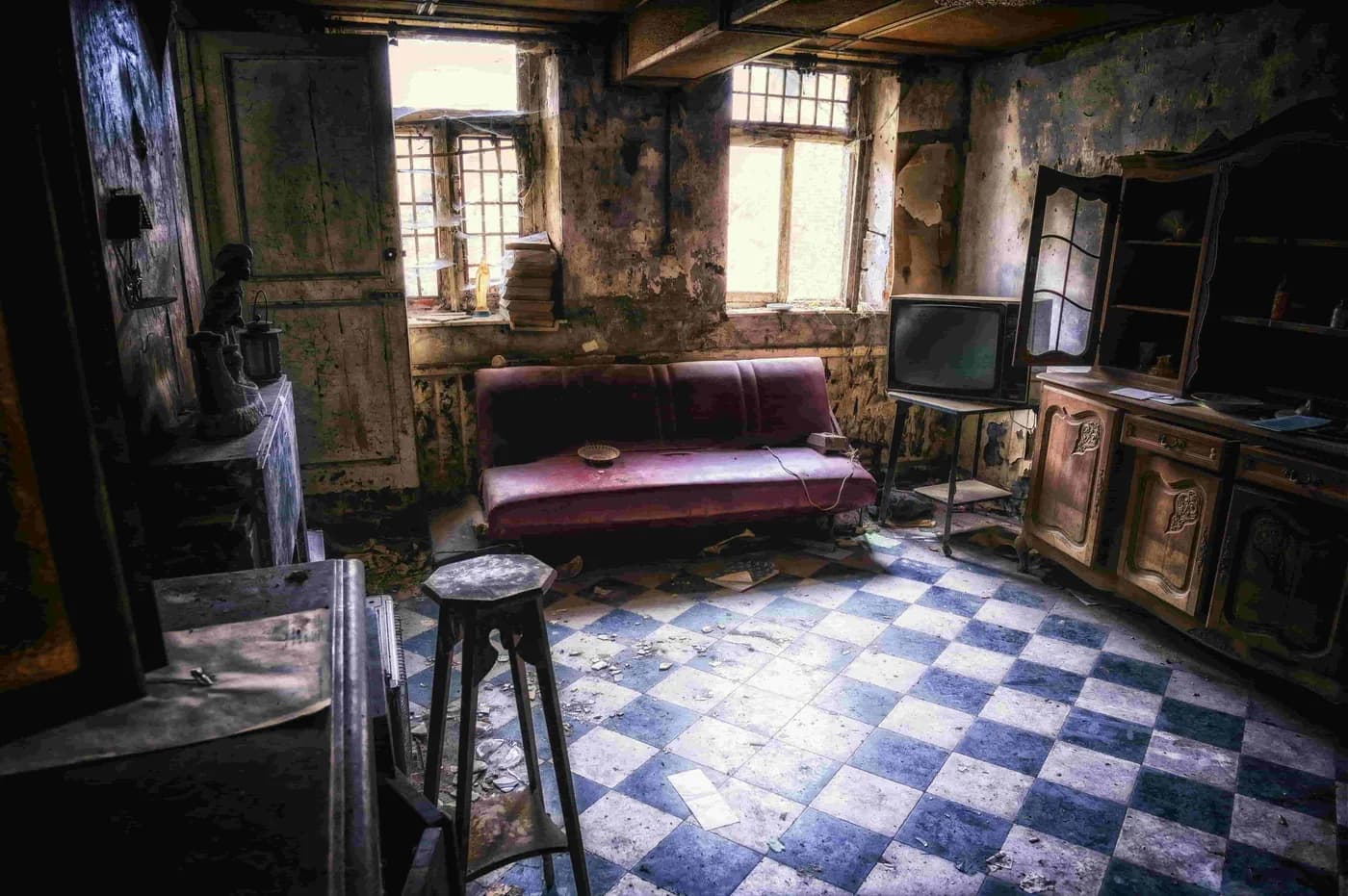
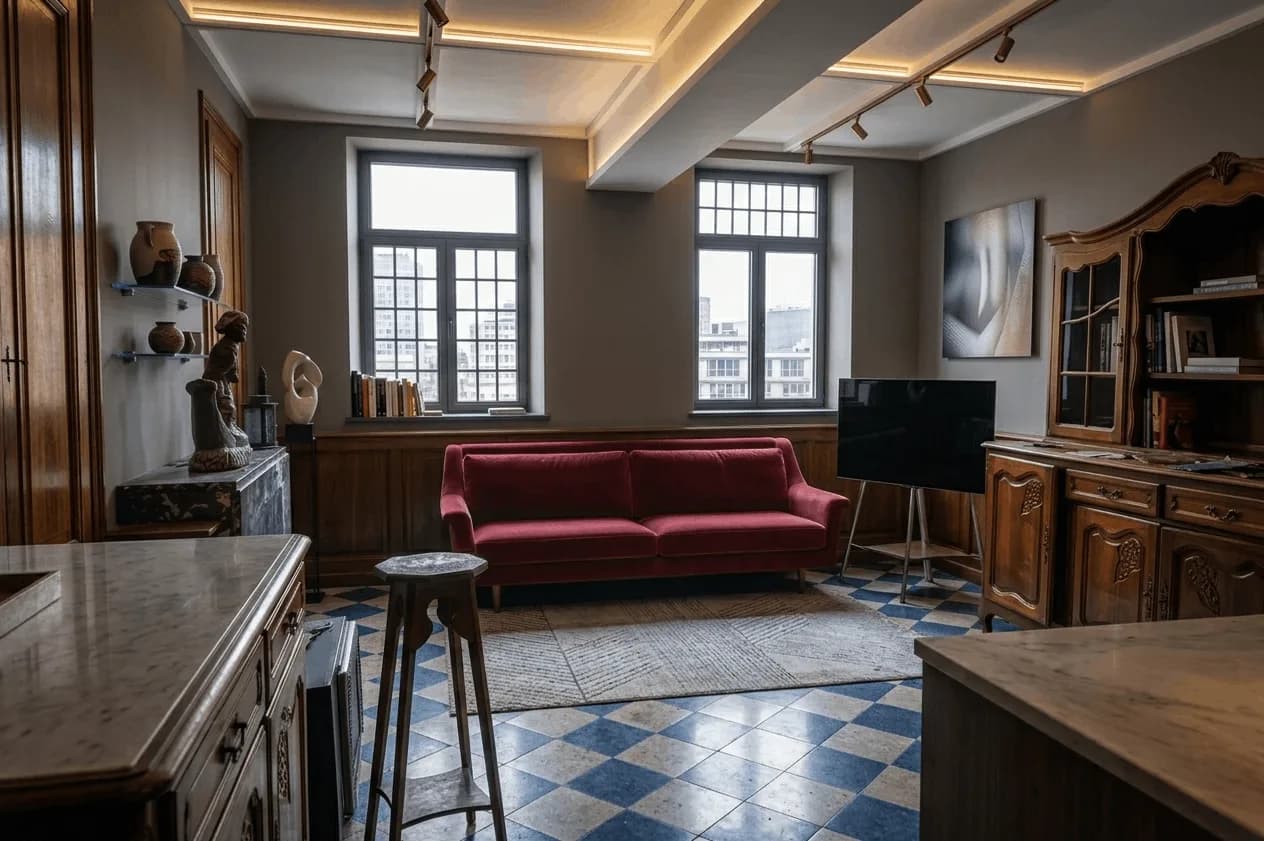
Dated beige living room with bulky brown sofa, heavy curtains, and a single overhead light before AI redesign
Before: Bulky brown furniture, beige walls, heavy drapes, one harsh ceiling light
Modern living room with a low-profile sofa, layered lighting, a textured rug, and warm wood tones after AI interior design
After: Low-profile sofa, layered lamps, textured rug, warm wood accents, calm palette

What Changed in This Room Redesign:

  • Oversized brown sofa swapped for a low-profile sofa in a soft neutral
  • Beige flat walls given a warm two-tone treatment with a feature wall
  • Single overhead bulb replaced with layered floor lamps and table lamps
  • Bare floor anchored with a large textured area rug to define the seating zone
  • Heavy drapes replaced with light linen curtains to let daylight in
  • Added greenery, art, and warm wood tones for depth and personality

What Is an AI Interior Designer?

An AI interior designer is an artificial-intelligence tool that turns a single photo of a real room into a photorealistic redesign in any style — modern, Scandinavian, Japandi, mid-century, industrial and dozens more — without hiring a designer or learning 3D software. It uses computer vision to read your room's geometry, light, and fixed features, then re-renders the surfaces, furniture, and styling while keeping the walls, windows, and proportions intact.

Unlike traditional room-planning software that asks you to model furniture and measure everything by hand, an AI interior designer is built for speed and inspiration. You point it at your actual room and it applies professional design principles — scale, balance, focal points, layered lighting — automatically, so you can compare ten directions in an afternoon.

Whether you are planning a full refresh, renting and want ideas without permanent changes, presenting concepts to a client, or staging an empty property, AI interior design gives you instant visualisation at a fraction of the cost of a design consultation (which typically runs $300+ an hour and still delivers only a few static mood boards).

How to Use the AI Interior Designer (Step-by-Step)

Step 1: Upload Your Room Photo

Shoot the room from the doorway so the AI sees the whole space and how light falls across it. Daylight gives the most natural result. Any room works — from a small studio corner to a large open-plan living area.

Step 2: Choose Your Interior Style

Pick from 20+ styles like Modern, Scandinavian, Japandi, Mid-Century Modern, Industrial, Farmhouse, or Coastal. Not sure which suits the room? Generate a few and compare them side by side.

Step 3: Add Specific Requirements (Optional)

Steer the result with plain-English notes like 'keep the original floorboards', 'add a reading nook', 'warmer lighting', or 'more storage'. The more specific you are, the closer the render lands to your vision.

Step 4: Generate & Download

Hit generate and wait around 30 seconds for photorealistic variations. Download your favourites in full resolution to share with a contractor, a partner, or to use as a shopping list for paint and furniture.

Ready to Redesign Your Room?

Start Free Interior Design →

Popular Interior Design Styles for 2026

Our AI interior designer supports every major aesthetic. Here are the most requested looks and what defines each:

Modern Interior Design

Clean lines, an open and uncluttered layout, a neutral base with one or two bold accents, and statement lighting. Built around negative space and restraint.

Scandinavian Interior

Light woods, white and soft-grey walls, cosy textiles, and abundant natural light. Functional, warm, and perfect for making small rooms feel bigger.

Japandi

A blend of Japanese minimalism and Scandinavian warmth — low furniture, natural materials, muted earthy tones, and a calm, intentional feel with nothing wasted.

Mid-Century Modern

Warm walnut tones, tapered legs, organic curves, and a retro-but-timeless palette of mustard, teal, and burnt orange against clean architecture.

Industrial Interior

Exposed brick and ductwork, metal and concrete finishes, leather, and Edison-bulb lighting for an urban, loft-inspired character.

Coastal & Organic

Soft whites, sandy neutrals, natural fibres like jute and rattan, and plenty of plants for a relaxed, biophilic, light-filled room.

💡 Not sure which style fits your space? Generate two or three and compare them in the same room instantly before committing.

AI Interior Designer vs Hiring an Interior Designer

FactorAI Interior DesignerTraditional Designer
CostFree – $39/month$1,500 – $5,000+ per room
Speed~30 seconds2 – 4 weeks for first concepts
RevisionsUnlimited & instantLimited, often billed per round
Best ForVisualising styles, budgeting, DIY, fast iterationStructural changes, custom joinery, project management
FlexibilityTry 20+ styles on your real roomLimited by the designer's preferred style

When to use AI: Use AI to lock the visual direction first — explore styles, test furniture scale and colour, and build a clear shopping list before you spend money.

When to hire a pro: Bring in a professional for structural changes, custom cabinetry, high-end specification, or when you need someone to coordinate trades and manage the project end to end.

Who Should Use an AI Interior Designer?

🏠 Homeowners Planning a Refresh

Test paint colours, furniture layouts, and styles on your real room before spending thousands. Make confident decisions instead of guessing from tiny swatches.

🔑 Renters Who Can't Renovate

Visualise what your rental could look like with new textiles, lighting, and arrangement — no permanent changes, just ideas you can actually act on.

🏢 Real Estate Agents & Stagers

Virtually stage an empty or dated room so buyers can picture themselves living there. Staged listings are perceived as higher value and sell faster.

🎨 Interior Designers

Generate multiple concept directions in minutes to align with a client early, then refine the chosen direction with your professional expertise.

💰 Budget-Conscious DIYers

Plan affordable updates by seeing the end result first. Avoid costly mistakes like buying a sofa that's the wrong scale for the room.

AI Interior Design Room by Room

Every room has its own rules. Here's how to get the best AI result for each:

Living Room Design

Aim for one clear focal point — usually the sofa-and-rug grouping — and a defined conversation zone. Ask the AI for layered lighting and a large rug to anchor the seating, and the room instantly feels more intentional.

Bedroom Design

Bedrooms are about calm. Generate a balanced headboard wall with symmetrical bedsides, soft layered low lighting instead of one bright fixture, and a muted palette that helps the room feel restful.

Home Office Design

Function leads here. Test desk placement against the window for daylight without screen glare, smart storage to cut clutter, and a backdrop that looks tidy on video calls.

Small Spaces & Studios

For tight rooms, lean on light colours, reflective surfaces, multi-use furniture, and vertical storage. The AI can show you how to make a small space read as open and airy rather than cramped.

Transform Your Home Today with AI

Join thousands of homeowners and renters who use HouseGPTs to visualise their dream room before they spend a cent. Get started free — no credit card required.

Start Designing Your Room Free →

✓ 2 free designs • ✓ No credit card • ✓ Results in 30 seconds

Frequently Asked Questions About AI Interior Design

The practical questions people ask before redesigning a room with AI.

Will the AI change my room's layout or only the decor?

By default the AI preserves your room's architecture — wall positions, window and door openings, ceiling height, and overall proportions all stay as they are in your photo. What changes is everything on top of that: furniture, flooring, wall finishes, lighting, textiles, and styling. If you want the AI to propose a different arrangement, say so in the requirements box ('move the seating away from the window', 'suggest an open-plan layout'), but treat structural suggestions as inspiration to validate with a builder rather than a construction plan.

Can I keep furniture I already own in the redesign?

Yes, to a degree. Name the pieces you want retained in the requirements field — 'keep the existing walnut dining table', 'keep the green velvet armchair' — and the AI will work the new scheme around them. It is more reliable at keeping large, clearly visible items than small accessories. A practical approach is to generate one version that keeps your key pieces and one that replaces everything, then compare what each is worth.

Does the AI interior designer work on empty rooms?

Yes, and it is one of the strongest use cases. Photograph the empty room from the doorway and the AI will furnish it completely, which is effectively virtual staging. Empty rooms actually produce cleaner results than cluttered ones because there is less existing content for the model to reason around. Estate agents and landlords use this to show an unfurnished property as a finished home before listing.

Can it handle awkward rooms — low ceilings, no natural light, odd shapes?

It handles them well, and these are the cases where visualisation is most valuable. For low ceilings the AI will typically favour low-profile furniture, vertical lines, and lighter ceiling treatments. For rooms with little daylight it leans on layered artificial lighting and reflective surfaces rather than pretending the light is there. For narrow or L-shaped rooms it will usually zone the space. Add the constraint explicitly — 'ceiling is only 2.2m', 'north-facing, very little daylight' — because the AI cannot measure these from a photo.

How do I turn a render into an actual shopping list?

Work backwards from the render in categories: one seating piece, one rug, one lighting scheme, one paint colour, then textiles and accessories. The render tells you scale, proportion, colour relationships, and material mix — which is the part most people get wrong — rather than specific SKUs. Take the download to a furniture retailer or search by the visual characteristics you can see (leg profile, upholstery texture, wood tone) and you will usually find close matches at several price points.

Will the furniture in the render be the right scale for my room?

The AI reads scale from your photo's perspective and generally gets proportions convincingly right, which is precisely the mistake that costs the most money in real life — a sofa two sizes too big for the room. It is not a measuring tool, though. Before you buy anything large, measure the real space and check the piece's dimensions against it. Use the render to decide what shape and visual weight belongs in the room, then verify the numbers with a tape measure.

Can renters use AI interior design without making permanent changes?

Yes. Add 'renter-friendly, no painting or structural changes' to the requirements field and the AI will focus on what you can actually change — rugs, lighting, textiles, freestanding storage, art, plants, and furniture arrangement. It is worth generating both a renter-friendly version and an unrestricted one: the second shows you what the room could be, which is useful when deciding whether to ask a landlord for permission to paint.

Can I keep a consistent style across several rooms in the same home?

Yes, and it is the right way to plan a whole-home refresh. Photograph each room, run them all through the same style with the same requirements text, and you get a coherent scheme rather than four unrelated rooms. For extra consistency, name the anchor elements in every prompt — the same wood tone, the same accent colour, the same metal finish. Hallways and landings are the ones people forget, and they are what tie the scheme together.

Can I blend two interior styles in one render?

Yes. Pick the style that describes the bones of the room, then use the requirements box to pull it in a second direction — 'Scandinavian but with mid-century walnut furniture', 'industrial shell softened with coastal textiles'. Most real interiors are hybrids rather than textbook single styles. Blending works best when the two styles share a palette or a material; combining two that fight each other tends to produce a muddled result.

How do I stop the AI changing something I want to keep?

State it as an instruction, not a description. 'Do not change the original floorboards', 'keep the fireplace exactly as it is', 'retain the sash windows and their trim' works far better than mentioning the feature in passing. Period features, flooring, and fireplaces are the three things people most often want preserved. If a render still changes something you protected, regenerate — results vary between runs, and repeating the constraint usually fixes it.

Are AI renders good enough to brief a decorator or contractor?

As a visual brief, yes — and tradespeople generally prefer them to verbal descriptions or a folder of unrelated inspiration photos. A render of your actual room removes most of the ambiguity about what you are asking for, which usually means tighter quotes and fewer changes mid-job. What a render is not is a technical document: it carries no dimensions, no specification, and no structural information. Pair it with measurements and a written scope.

Can I see the same room in different lighting?

Yes. Ask for it directly — 'bright midday daylight', 'late afternoon low sun', 'evening with lamps on only' — and generate the same style two or three times. This matters more than most people expect, because a scheme that looks calm in daylight can read cold or gloomy under artificial light. Testing the evening version is the fastest way to find out whether your lighting plan needs more than one light source.

Can I use the images I generate commercially?

Designs you generate are yours to use, including for client presentations, property listings, and social media. The usual practical limits apply: free-tier images carry a HouseGPTs watermark, and paid plans remove it and unlock full-resolution exports. If you are presenting renders to a client or publishing them in a listing, label them as AI visualisations rather than photographs of the finished space — it sets expectations correctly and avoids any suggestion the room already looks like that.

AI Interior Design — Redesign Any Room in 30 Seconds

HouseGPTs AI Interior Designer transforms photos of real rooms into professional redesigns across 50+ interior styles — Modern, Scandinavian, Bohemian, Industrial, and more. Upload a photo of any room, pick a style, and get a photorealistic result in under 30 seconds. No design software, no experience needed.

  • 50+ interior styles — from Minimalist to Maximalist, Farmhouse to Cyberpunk
  • Works for any room — living room, bedroom, kitchen, bathroom, home office
  • AI preserves room dimensions and structure while transforming the aesthetic
  • Furniture, lighting, and material suggestions built into every render
  • Download high-resolution results for contractor briefs or shopping guides
  • Free to try — 2 designs free, no credit card required

Why AI Interior Design Is Replacing Mood Boards

Traditional interior design mood boards show inspiration images that look nothing like your actual room. AI interior design tools apply those inspirations directly to a photo of your room — so you see a realistic preview of the finished space, not a theoretical concept.

Homeowners use AI interior design to make more confident buying decisions, brief contractors more precisely, and avoid the most expensive mistake in renovation: buying the wrong thing and living with it.

Who Uses This Tool

🛋️

Furniture shopping

See how furniture looks in your actual room before purchasing — eliminate expensive buying mistakes.

🎨

Colour & material planning

Test wall colours, flooring, and textiles on your real room before ordering samples or paint.

🏗️

Renovation scoping

Generate visual briefs that give contractors a precise reference — reducing miscommunication and scope creep.

💡 Pro Tips for Better Results

1

Shoot your room from a corner — capture as much of the space as possible for better AI context.

2

Midday natural light produces the best AI interior results.

3

Use the custom prompt field to add specific instructions like 'add a built-in bookshelf on the right wall'.

Frequently Asked Questions

What rooms does the AI interior designer work for?
The AI interior designer works for living rooms, bedrooms, kitchens, bathrooms, dining rooms, home offices, hallways, and any other interior space.
Can AI interior design help me choose between different styles?
Yes — this is one of the most popular use cases. Upload one photo and generate the same room in multiple styles to compare them side-by-side before making a decision.
How accurate is the AI interior design result?
AI interior design is highly accurate for aesthetic changes — furniture styles, colour schemes, material selections, and lighting. It's not designed to verify structural feasibility or building codes. Use AI renders for design direction and inspiration, then work with contractors for technical implementation.
Is HouseGPTs AI Interior designer free?
Yes — HouseGPTs gives you 2 free interior design generations with no credit card required. Paid plans start at $24/month (Starter, 500 credits) and go up to Studio at $79/month; every paid plan removes the watermark and unlocks HD exports.
How long does an AI design take to generate?
Most designs are generated in 20–40 seconds depending on the model selected. The Aperture Basic model is fastest (10–20 seconds). The Aperture Ultra model produces the highest quality results and takes 30–60 seconds.
Do I need design experience to use HouseGPTs?
No design experience is needed. Upload a photo, select a style, and click generate. The AI handles all the design decisions automatically. If you have specific requirements, use the optional text field to add instructions.
What photo should I upload for best results?
Take a clear photo showing as much of the space as possible. Natural daylight lighting produces the best results. Avoid photos taken at night or in low light.
Can I download my AI-generated designs?
Yes. All generated designs can be downloaded in full resolution. Subscriber designs come without a watermark. Free tier designs include a small HouseGPTs watermark.

Ready to Try It?

2 free designs — no credit card required.

Start Designing for Free →